24 de out. de 2011

Using LiLi to create a Bootable, Portable and Virtualized USB Drive

Using LiLi to create a Bootable, Portable and Virtualized USB Drive:
LinuxLive USB Creator, or “LiLi”, is a quick way to create Live Linux USB drives that are persistent virtualized drives. Typically, Linux USB drives require rebooting to install software. It is possible to create a Linux USB drive that will install without a reboot. This is where LiLi comes into play. By setting drive persistence for the USB, you are able to save files and settings on the USB which would normally be lost once the Linux USB drive is dismounted. Creating Linux USB drives is not an unfamiliar subject, but using LiLi is different. It is the feature of drive persistence that makes this method unique. There is also the ability to open your Linux OS in Windows with a portable version of VirtualBox.
Download and install the latest version of LiLi from the link that follows.
Follow all of the steps in the installer and click Finish at the end. Check the box to “Run LinuxLive USB Creator”. The application will launch and you can get started if you already have the LinuxLive ISO downloaded or on CD/DVD.

10 de out. de 2011

Online Virus Scanners


Bitdefender Online Scanner – requires Internet Explorer 4+
Eset Online Scanner – requires Internet Explorer
F-Secure Online Scanner – works only with Internet Explorer 6+
Kaspersky Free Virus Scan – browser independent, downloads roughly 25 Megabytes of files prior to scanning. User can select locations to scan. The scanner does not remove infected files.
McAfee FreeScan – requires Microsoft Internet Explorer 5.5+
Microsoft OneCare Live – requires Internet Explorer.
Panda ActiveScan – requires Internet Explorer or Firefox, does not run in Opera.
Shields Up! – browser independent but very slow and unresponsive currently.
Symantec Security Check – down or gone.
Trendsecure HouseCall – Java based scanner, works with Java compatible browsers.
Windows Security – Trojan scan that requires Internet Explorer 5+
File Scanners:
Avast Online Scanner – file size limit of 512 Kilobyte
Virus Scan – file size limit of 10 Megabyte.
Virus Total – email upload option, 10 Megabyte file size limit.


Source: http://www.ghacks.net

30 de mai. de 2011

Microsoft Standalone System Sweeper

Microsoft Standalone System Sweeper: "
Microsoft has just released a beta of a system recovery software. Microsoft Standalone System Sweeper has been designed to aid users in starting an infected PC and performing offline malware scans to remove viruses, trojans, rootkits and other forms of malware effectively. It is also used if malware is hindering the user to install or start an antivirus software on the infected system, or if the applications used to detect malware are not able to find the malware on the PC.

Microsoft Standalone System Sweeper can be downloaded as a 32-bit or 64-bit version. Users who download the small executable need an active Internet connection to burn all contents to CD or DVD, or an USB stick with at least 250 Megabytes of space in case they want to copy the Microsoft Standalone System Sweeper to USB instead.

Setup data is loaded from the Internet when the program is started. To use it, users need to boot from the disc or USB device which in turn loads the tool that gives you the options to scan the PC and recover it. It will load the Windows Preinstall Environment to run the Microsoft Standalone System Sweeper application for scanning and remediation of virus and malware.

microsoft standalone system sweeper

standalone system sweeper

system sweeper

Interested users can download Microsoft Standalone System Sweeper from the official project website. It is basically a recovery CD or USB application that Windows users can use to remove malware from a system.

The program requires a recent Windows operating system, from Windows XP SP3 to Windows 7. Users need to make sure to download the right program version. If they have a 32-bit operating system, they need to download and install the 32-bit version of System Sweeper, if they run a 64-bit operating system they need to download the 64-bit version.

An Internet connection is required to download the latest virus and spyware definitions for Standalone System Sweeper. Supported web browsers are Internet Explorer 6 or higher, or Mozilla Firefox 2 or higher.


© Martin Brinkmann for gHacks Technology News | Latest Tech News, Software And Tutorials, 2011. |
Permalink |
Add to
del.icio.us,
digg,
facebook,
reddit,
twitter


Post tags: , ,

"

6 de mai. de 2011

Coisa linda: Google lança site que mostra volume de buscas pelo mundo

Coisa linda: Google lança site que mostra volume de buscas pelo mundo: "
Não dá para não reconhecer que criatividade é coisa séria no Google. A empresa utiliza esta característica não só para criar e aperfeiçoar seus serviços, mas também para promovê-los. Uma das mais recentes novidades neste sentido é uma ferramenta inusitada: o Google Search Volume.

Trata-se de um globo semelhante ao que é exibido no Google Earth que mostra volumes de buscas por idioma no mundo todo. Cada língua possui uma cor. Por exemplo: português é verde, azul claro é inglês, amarelo é espanhol e assim por diante. Quanto maior a linha, mais busca em determinado idioma aquela localização está tendo.

Google Search Volume

O Google Search Volume necessita de WebGL, basicamente, um especificação relacionada ao HTML5 criada para facilitar a exibição de gráficos 3D em navegadores. Com isso, além do Chrome, a novidade funciona apenas no Firefox 4. No Internet Explorer 9, no Safari e no Opera, necas.

E se você acha que a ideia é legal, mas que não é lá essas coisas para promover o Chrome, tudo bem, fique com o vídeo abaixo. Vai ser o momento “so cute” do seu dia ;)


Para quem não entendeu, o vídeo mostra um pai criando uma conta no Gmail para a filha que está para nascer e, com o passar do tempo, enviando mensagens para esta conta com imagens e vídeos de momentos da vida dela. Tudo isso utilizando o Chrome. Totalmente excelente, não?

Emerson Alecrim

_________________________________

Texto exclusivo do Blog InfoWester. Se você está vendo esta mensagem fora do InfoWester ou do seu leitor de feeds, significa que o site que está acessando utiliza este conteúdo de maneira indevida. <
Posts relacionados:
  1. Google apresenta o Chrome OS, onde o mundo off-line não tem vez

  2. Guerra das buscas: Google acusa Bing de roubar seus resultados

  3. Site faz campanha pelo fim da CPMF – participe!


"

7 de abr. de 2011

Goodbye Firefox. Hello Chromium.

Goodbye Firefox. Hello Chromium.: "After using Firefox for six years, I've finally come to the end of the road with it. Learn why, as well as why I chose Chromium to replace it as my primary Web browser."

2 de abr. de 2011

Windows Context Menu Manager

Windows Context Menu Manager: "

Getting Windows to start the right program on double-click can be quite the daunting task. Not that it is usually that difficulty to link a file extension to a default program, but sometimes, it just does not stick. For me, it is a month long problem with torrent files that display the open with dialog even though I have selected a default program.

What can you do to resolve those file association issues? You can either try to resolve the issue by uninstalling and installing applications again, start editing the Windows Registry, or use a program like Context Menu Manager which makes the configuration process more comfortable.

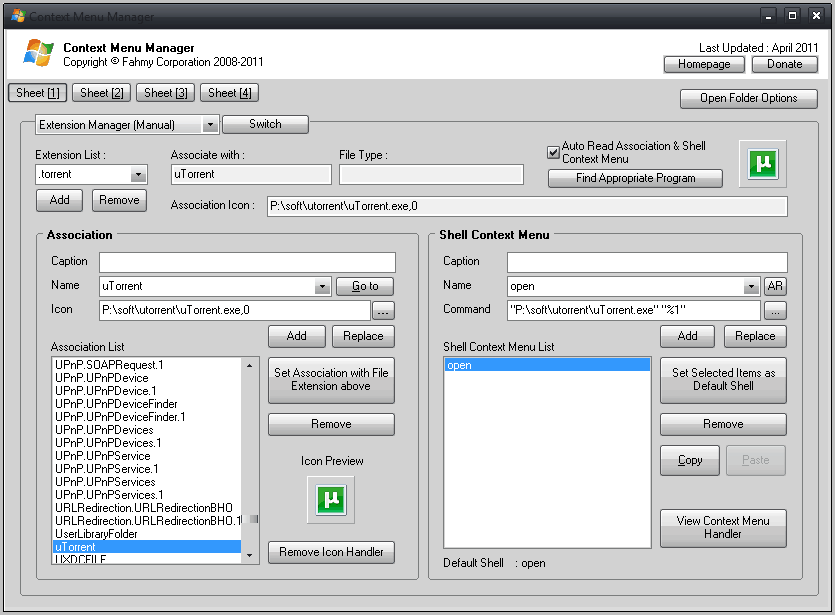
The portable software displays all file extension management options on the first screen after it has been started. You select a file extension from the Extension List drop down menu to change file associations and shell context menu entries. New file types can be added, and existing ones removed for a clean start.

windows context menu manager

One interesting option here is the option to find the best suitable program for the file type. This is done with a click on Find Appropriate Program which opens a Microsoft website in the default Internet browser.

You can make changes to the default file association of the program, for instance to switch from one program to a new one that you have installed or available on the computer. Context menu entries can be removed, added or edited.

The Windows application links to three additional pages that offer more context menu related features.

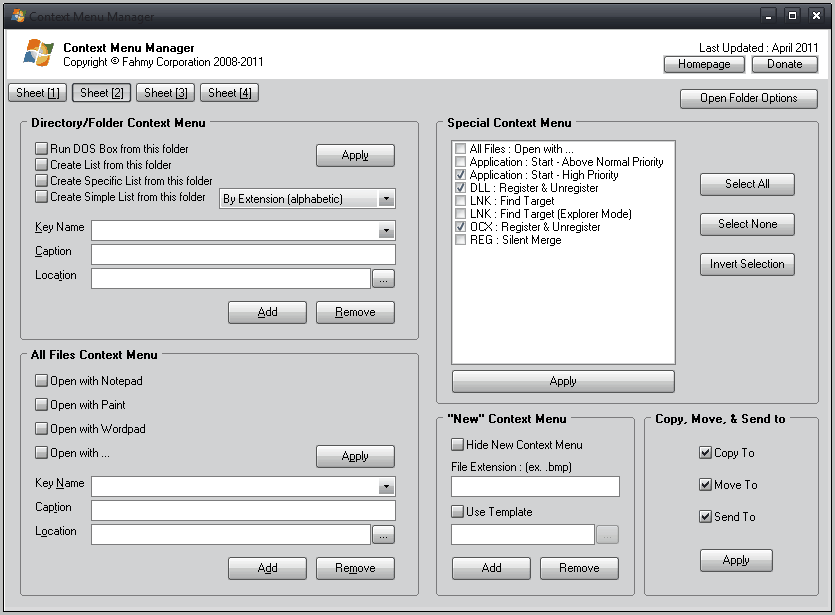
You can add new context menu entries on page two, for instance to run a program with a different priority setting, or to register or unregister dynamic link libraries and ocx files.

There are also options to run a dos box from the active folder, add new open with links or to add copy, move and send to commands to the context menu.

context menu manager

The features offered on the second page can extend the functionality of the context menu further.

I’m not really sure about the purpose of the My Extension Manager on page three of the program. My guess is that it can be used to configure alternative programs for specific file extensions, in a similar manner as the portable software eXpresso does.

You can add file extensions and parameters on the page that can then supposedly be opened with the selected application.

This demonstrates one of the weaknesses of the program. There is no help or documentation which may leave you guessing at times what a specific feature does.

The fourth and final page can add context menu items to the My Computer context menu. From changing the computer’s state to adding links to Windows control panel applets and basic tools. It is all there and selectable.

Context Menu Manager is a solid program that is very effective when it comes to editing, adding or removing context menu items and default program associations. The software has been tested on a 64-bit edition of Windows 7. Downloads are provided at the developer website (linking to download portals). I have tested the program on Virus Total and it turned out to be clean. I suggest you do the same before you run it for the first time.


© Martin Brinkmann for gHacks Technology News | Latest Tech News, Software And Tutorials, 2011. | Permalink | Add to del.icio.us, digg, facebook, reddit, twitter
Post tags: , , ,

"

MyEventViewer – Registos de sistema facilitados

MyEventViewer – Registos de sistema facilitados: "Todas as acções que fazemos no nosso Windows têm um impacto mais ou menos positivo no nosso sistema operativo. As acções que mais impacto negativo têm, ficam registadas para posterior consulta em caso de problemas. É esse o papel do registo de eventos. Todos esses registos podem ser acedidos, mas a quantidade de informação que [...]
"

25 de mar. de 2011

Mount Disk Images With OSFMount

Mount Disk Images With OSFMount: "

Disk images come in various formats and sizes, from tiny floppy drive images to huge bit to bit copies of partitions or entire hard drives. These disk images can be mounted, which basically means that they become accessible under a drive letter in the operating system.

Mounting images can be interesting for several reasons, including the ability to play games without the physical game DVD, to watch movies without the DVD or to try to recover data from a corrupt hard drive partition.

Disk images can be created by specialized applications, and also downloaded from the Internet. Microsoft is for instance distributing disk images of their applications regularly, and many Linux distributions are provided as disk images as well. Some programs can access disk image formats directly, CD and DVD burning software for instance, while others can only access the data if the image has been mounted first.

OSFMount is a lightweight software for Windows that supports a variety of disk images. Among the supported formats are popular disk image formats such as ISO, Bin, IMG and NRG plus some exotic formats like DD, VMDK and AFD.

The program lacks support for some lesser used disk image formats, like mdf or ccd. OSFMount comes with a handful of extra options that are not commonly found in disk image programs.

Disk images are mounted with a click on Mount New, the keyboard shortcut Alt-n or the selection of File > Mount New Virtual Disk.

mount drive

The mount drive window offers to mount disk images normally or in RAM. A supported disk image format needs to be selected with the help of the file browser. Advanced options include selecting an image file offset, the size of the drive, drive letter and drive type. All disk images are mounted as read only drives by default which can be changed in the program options as well.

It is furthermore possible to create an empty ram disk that is then accessible via the mapped drive letter.

All mounted disk images become available immediately, empty disks needs to be formatted before they can be used.

The main interface lists all mounted virtual disks. All disks can be unmounted at anytime. A right-click displays a context menu with additional options, among them the option to change the size of a disk image, save the current data to a supported disk image format or make the disk read-only or writable.

mounted virtual disks

The ability to write data could be interesting for some users. You could use the option to create a ramdisk, install applications to it, save the state of the ramdisk to a disk image format once you are finished working for the option to mount the image again at a later time.

The program seems to support as many mounted disk images as free drive letters are available.

Interested users can download OSFMount from the developer website. It is provided as a 32-bit and 64-bit application there that supports all major client and server versions of the Windows operating system.


© Martin Brinkmann for gHacks Technology News | Latest Tech News, Software And Tutorials, 2011. | Permalink | Add to del.icio.us, digg, facebook, reddit, twitter
Post tags: , ,

"

21 de mar. de 2011

ICANN aprova domínios XXX

ICANN aprova domínios XXX: "A guerra tinha muitos anos e estava a pender para o lado de quem não queria a aprovação deste TLD. A indústria pornográfica insistia que deveria haver um domínio específico para os seus conteúdos e sites, o que chocava com a vontade do ICANN. No entanto a pressão foi feita e o ICANN acabou por [...]
"

14 de mar. de 2011

26 Internet Websites That You Have Not Heard About, But Should

26 Internet Websites That You Have Not Heard About, But Should: "

Every Internet user knows Facebook right? Gmail, Yahoo, Microsoft and Twitter are also fairly common. But have you ever heard of Jinni, Joongel or Jangle ? No? Then read on to find out what they, and 23 more sites have to offer.

It is surprising that you cannot find a single site on the Internet that collects those unique, rare websites. You find the occasional top list that is usually outdated, with half the sites down for good, but no service that’s maintaining a list of the Internet’s top sites.

Maybe there is such a service, but if it is it is damn hard to find. I first thought Delicious or other directories or bookmarking services could be used for the discovery, but they are polluted that it is hard to find the gems among the thousands of sites.

The following 27 sites are unique and wonderful. You may have heard about some of them before, but I’d bet that you will discover at least a few gems among the services and sites listed below.

Recommendations

Recommendation engines are similar to search engines. The main difference is that they will recommend something to you based on your input.

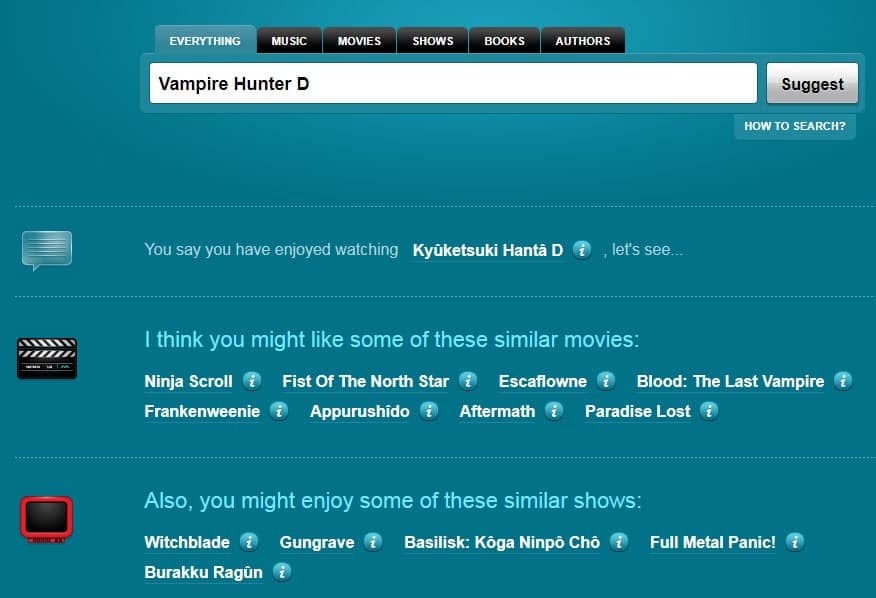
Tastekid – A recommendations website to discover new books, movies, music, shows and authors. just enter what you like and Tastekid will display items that are similar. That way, you can find new items that you have not heard before that are “like” something that you already know.

recommendations

Jinni – Concentrates on movies recommendations. One interesting aspect is that you can not only enter movie and TV show titles but also plots or themes. Just enter Gothic Horror for instance to be presented with recommendations such as Sleepy Hollow, Interview with a Vampire or Frankenstein.

Alternative To – Looking for a program or service that is like something you know? Alternative To may have suitable candidates for you.

Search

Google is not the only search engine. There are thousands of specialized search engines that often provide better and different search results.

Joongel – combines access to multiple niche-specific search engines. Available niches include music, images, social, gossip and torrents. Joongel displays results from one of the search engines with an option to switch to any of the other available search engines immediately.

joongel

Scroogle – Search Google without cookies and search history. Helpful if you cannot install add-ons or extensions to achieve that.

Supercook – Ever wondered what you could cook with the ingredients that you have at home? Enter supercook. Just enter what you have and the recipe search engine will spill out recipes that match those ingredients.

Commerce

People like to shop. The services listed below improve your shopping experience.

Swap A Skill – Need something done? Then trade it for something you are good at in. Shoes for legal advice, a patio for french lessions, holiday in India for website? All that and more is possible at Swap A Skill.

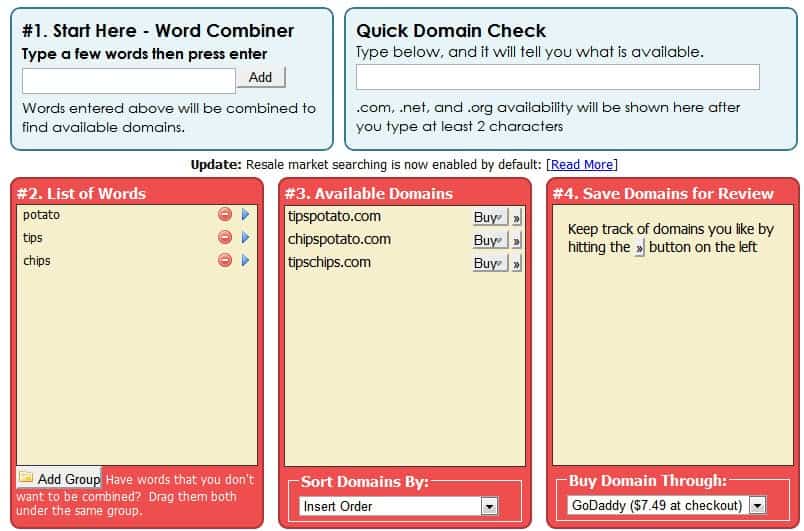
Bust A Name – Combines words to find free domain names.

bust a name

Jangle, Searches Amazon.com for bargains and displays them in a neat sorted listing on their website.

Etsy – A marketplace for handmade goods. Carries everything from art over bags and purses to toys and supplies.

Media

Music and video mainly. Resources to discover new media, or listen to it online without paying a dime.

Jamendo – Offers nearly 300,000 free music tracks. Albums can be downloaded or listened to online. Great for discovering music that is not in the mainstream.

Nutsie – Takes your iTunes library to the web, only the album and song information that is, nothing gets transferred. You can then listen to your songs, or new recommendations online from a compatible PC or mobile device.

Hypem – Discover new music. The service adds new music that is posted on music blogs all the time, with options to play the music right on site, and visit the original blog.

Musicovery – Another music discovery engine. Select a mood, favorite song or artist and listen to related music.

Gaming related

Like games? These gaming related websites either invite you to play games online or offer a wealth of information about games.

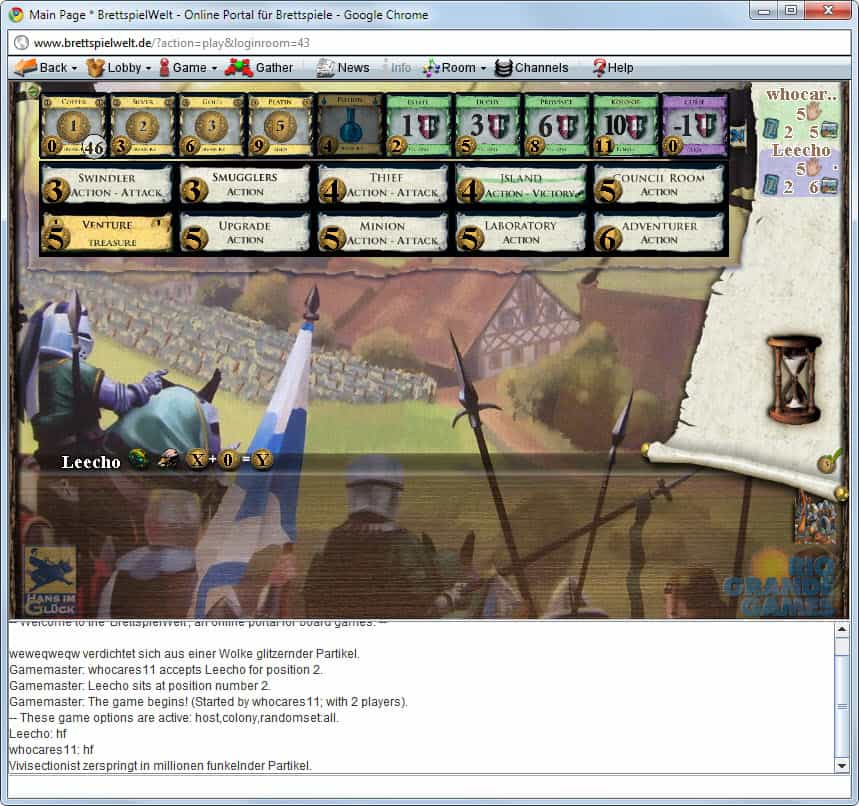
Brettspielwelt – A multi-lingual online board games website. The Java driven website invites players from all over the world to play popular board games, from Settlers of Catan and Carcassonne to Dominion and Backgammon, against other players on the site.

brettspielwelt

Board Game Geek – Without doubt the largest English board game related website in the world. The site offers user based rankings, reviews, rule discussion and more. If you need information about a particular board game, or like to find a new one, then it is the site to go to.

Apps

Applications and online services.


Portable Freeware Collection
– Site that lists the latest portable freeware releases and updates.

The Rasterbator – Create a poster out of a standard sizes image. Uses rasterized images, posters can be up to 20 meters in size. Block Posters is an alternative that uses the same technology.

KeyXL offers a searchable keyword shortcut database. Just enter a program name and hit go to see available shortcuts for it. You can filter by platform or software category if you like.

xFruits – Offers to aggregate and forward news feeds and other forms of communication to one another. It is for instance possible to create an RSS to pdf, mail to RSS or RSS to mobile module on the site.

Misc Internet

Everything else that did not fit into one of the other categories.

Cl1p – An Internet clipboard. Create a unique url that starts with cl1p.net to paste text and other information into the opening editor. A click on save stores the information so that they can be accessed again in the next seven days.

Web 2.0 Calc – A handy online calculator with history feature. An alternative is Ecalc.

calc

Rainy Mood – 30 minutes of relaxing high quality background rain to relax.

The Best Page in the Universe – If you every wanted to see the best page in the universe, this is it. Even if you disagree, it is pretty funny.

What Happened In My Birth Year – Displays information about the year entered including what people did, the top books, movies and music of that year and other interesting information.

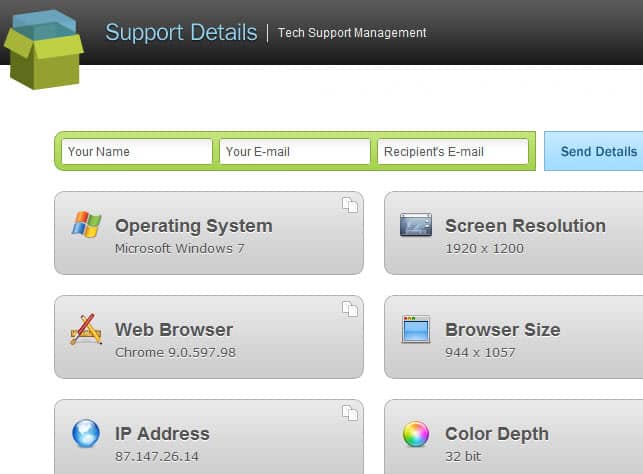
Support Details – If you ever had to talk to tech support you may have had problems answering questions about your operating system, web browser or IP address. Support Details list the important information, at least where online support is concerned, on a single page.

support details

Metacritic – Do not trust reviews of a single website, paper or reviewer? Metacritic combines the review scores to present you with an average for the game, movie, tv show or music that you like to know more about.

Do you know of a website or service that should be in the list? Post your url in the comments. Please note that I will review every posted site before they go online, to avoid spam.


© Martin Brinkmann for gHacks Technology News, 2011. | Permalink | Add to del.icio.us, digg, facebook, reddit, twitter
Post tags: , , ,

"

How To Flush The DNS Cache In Windows

How To Flush The DNS Cache In Windows: "

The Microsoft Windows operating system stores all DNS look-ups in a cache to speed up the connection for future visits to previously visited websites or servers. DNS for simplifications sake turns domain names like ghacks.net into IP addresses like 96.30.22.116. To simplify it further: computer users make almost exclusive use of domain names, while computers and devices of IP addresses.

The DNS provider is queried during each connection attempt unless the information are already stored in the cache.

You may want to know why someone would want to flush the DNS cache? Lets say you have decided to switch from your provider’s DNS server to Open DNS, Google DNS or another free service that promise faster speeds and little extras like user-configured site filtering. If you switch during a session, you will be using old data from the cache if you access sites that you have already visited.

Not a big problem? You may be right, but think about the following situation. A webmaster migrates the website to a new server. It can take up to 48 hours before all DNS servers redirect users to the website on the new server and not the old server. Some webmasters change their DNS server before migrating if the ISP’s DNS server is known to be on the slow site when it comes to updating information (another option for webmasters is to edit the hosts file).

The DNS cache can have privacy implications as well, especially on public computer systems or multi-user systems. It is possible to display the contents of the cache, which in turn reveals all the websites that have been visited by the user in the session. Flushing the cache removes the entries so that the next user won’t be able to see a list of visited websites.

Flushing the DNS Cache

On to the commands. Windows users need to open a command prompt to flush the DNS cache. The easiest way to do that is to press Windows-r, type cmd, and hit the enter key.

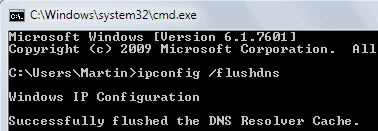
The command ipconfig /flushdns clears the DNS cache. All records up to this point in time are removed from the cache.

C:\Users\Martin>ipconfig /flushdns
Windows IP Configuration
Successfully flushed the DNS Resolver Cache.

ipconfig flushdns

Displaying the DNS Cache

You can test if the DNS cache has been flushed with the command ipconfig /displaydns. Please note that the command may still display entries, but those are new entries that have been added to the cache after it has been flushed. Antivirus software may for instance connect automatically to update servers.

C:\Users\Martin>ipconfig /displaydns
Windows IP Configuration

ipconfig displaydns

Turning Off DNS Caching

DNS caching can be turned off for a session or completely. The negative effects are that look-ups may take longer, especially in computer networks with connected network shares and devices. Computer workstations without network connections on the other hand are likely not negatively effected by the operation. It is probably best to experiment with the setting first, by disabling it temporarily for a session.

The command to stop the DNS Cache for the active session is net stop dnscache. Please note that you need administrative privileges to run the command successfully. Windows 7 users can do that by clicking on the start menu orb, selecting All Programs > Accessories, right-clicking on Command Prompt and selecting Run as Administrator. The path should be similar for other versions of Windows.

c:\windows\system32>net stop dnscache
The DNS Client service is stopping
The DNS Client service was stopped successfully.

stop dns client service

You can start the DNS client service again with the command net start dnscache.

The previous instructions turned off the DNS cache for a single session. A restart would load it as a service again. It is however possible to turn off the DNS cache completely. This is done with the shortcut Windows-r, typing services.msc and hitting enter.

Locate the service DNS Client in the listing and double-click it. The window that opens offers controls to stop the service for the current session, and to change its startup type from manual to disabled.

dns client service

Disabled means that it won’t be started with Windows, which effectively disables the DNS Cache permanently. Another benefit of this is that other users are not able to display the DNS cache to retrieve a list of visited websites and servers.

Windows users who are thinking about disabling the DNS Cache permanently should test it first by disabling the cache for the session. If they do not notice performance drops or slower than usual connections they could go ahead and disable the cache completely.


© Martin Brinkmann for gHacks Technology News, 2011. | Permalink | Add to del.icio.us, digg, facebook, reddit, twitter
Post tags: , , ,

"

5 de mar. de 2011

MultiScan, Scan Local Files With Multiple Antivirus Programs

MultiScan, Scan Local Files With Multiple Antivirus Programs: "

The idea to scan files with multiple antivirus engines is not new, online portals such as Virustotal offer that feature for quite some time. If you look at desktop applications you notice that there are not many that offer a similar functionality. Programs that fall into the category are the previously reviewed Antivirus Multi and Avert.

MultiScan offers in many regards a similar functionality when compared to those two programs. The portable application can be configured to scan local files in up to ten different antivirus engines. The configuration is unfortunately not as comfortable as that of Avert, since it is necessary to download and add the antivirus programs and command line options manually. To make matters worse, there is no list of supported or recommended command line antivirus scanners on the developer’s site.

Links to free antivirus programs that support command line scanning would make the process a lot easier.

multiscan

Below is a selection of free options:

AVG
Avira Command Line Scanner
ClamWin
Panda Antivirus Command-Line Scanner (2009 last update)
VIPRE Rescue

Many commercial antivirus solutions offer command line scanners as well. Check the documentation or look in the program directory.

Downloading the different engines is just the first part of the setup as they need to be added to MultiScan before the program can utilize their antivirus engine in scans.

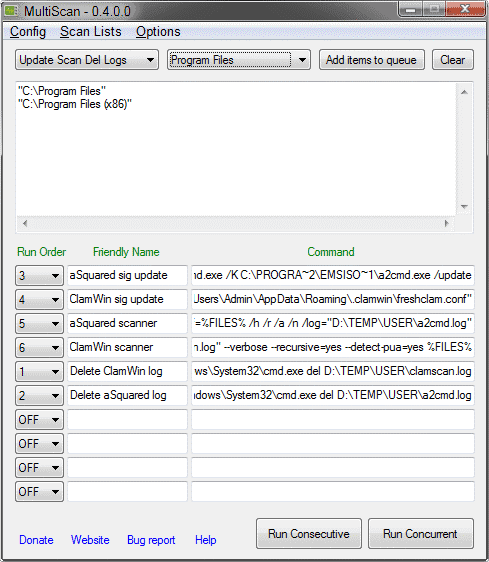
New commands are added in the main program interface.

MultiScan configuration

Run Order and Friendly Name are the easiest to explain. The first determines the order in which the commands are run by MultiScan, the latter is a name that describes the command to make it easier identifiable.

The command field finally contains the command that you want to run. This requires research on the antivirus developer homepage or readme file to get the scanning syntax right. An example of a config line would be the following:

C:\Windows\System32\cmd.exe /K C:\PROGRA~2\ClamWin\bin\clamscan.exe --database
=E:\SYSTEM\ClamWin\db --recursive=yes %FILES%

The code runs the Windows command line, and then clamscan.exe with several parameters. The %Files% variable is replaced by the selected files and folders for the scan.

MultiScan is not limited to scanning files with antivirus engines. It is for instance possible to configure the program to run a database update for a specific antivirus engine before it is used to scan the files. Other options include deleting old log files or displaying alerts, provided the correct programs or commands are added to the command field.

Configurations can be saved at any time. Saved configurations are then selectable via a pulldown menu in the main interface. This opens new possibilities like running commands for specific situations.

But it is not only configurations that can be saved. File listings can be saved as well so that it becomes possible to scan previously saved files and folders with saved configurations. This makes the process very comfortable once the initial setup has been completed and thoroughly tested.

Files and folders can be scanned by adding items to the queue from within the program interface, by selecting them in Windows Explorer after enabling Windows Explorer integration in the options or by selecting previously saved file listings.

Verdict

MultiScan has lots of potential and several interesting features. The ability to save commands, their run order and file listings is excellent. The downside is the complicated configuration, which the developer should work on. A good start would be to integrate links to command line antivirus scanners and their documentation on the program site. Example configurations for those programs would be the next step, and eventually the integration of those information in the program itself.

MultiScan is a portable software for Microsoft’s Windows operating system. It tested fine on a Windows 7 Professional 64-bit system, and should run fine on other systems as well.


© Martin for gHacks Technology News, 2011. | Permalink | Add to del.icio.us, digg, facebook, reddit, twitter
Post tags: , , , ,

"

28 de fev. de 2011

Tiny Core Linux and Operational Readiness

Tiny Core Linux and Operational Readiness: "

When installing, configuring, or managing VMware virtual infrastructure, one of the steps which should be performed before releasing a host (back) to production is to perform operational readiness tests. One test which is quite critical is that of testing virtual infrastructure networking. After all, what good is a running VM if it has no connectivity to the rest of the network? Each ESX or ESXi host pNIC should be individually tested for internal and upstream connectivity, VLAN tagging functionality if in use (quite often it is), in addition to proper failover and fail back, and jumbo frames at the guest level if used.


There are several types of VMs or appliances which can be used to generate basic network traffic for operational readiness testing. One that I’ve been using recently (introduced to me by a colleague) is Tiny Core Linux. To summarize:


Tiny Core Linux is a very small (10 MB) minimal Linux GUI Desktop. It is based on Linux 2.6 kernel, Busybox, Tiny X, and Fltk. The core runs entirely in ram and boots very quickly. Also offered is Micro Core a 6 MB image that is the console based engine of Tiny Core. CLI versions of Tiny Core’s program allows the same functionality of Tiny Core’s extensions only starting with a console based system.


TCL carries with it a few of benefits, some of which are tied to its small stature:


  • The minimalist approach makes deployment simple.

  • At just 10MB, it’s extremely portable and boots fast.

  • As a Linux OS, it’s freely distributable without the complexities of licensing or activation.

  • It’s compatible with VMware hardware 7 and the Flexible or E1000 vNIC making it a good network test candidate.

  • No installation is required. It runs straight from an .ISO file or can boot from a USB drive.

  • Point and click GUI interface provides ease of use and configuration for any user.

  • When deployed with internet connectivity, it has the ability to download and install useful applications from an online repository such as Filezilla or Firefox. There are tons of free applications in the repository.


As I mentioned before, deployment of TCL is pretty easy. Create a VM shell with the following properties:


  • Other Linux (32-bit)

  • 1 vCPU

  • 256MB RAM

  • Flexible or E1000 vNIC

  • Point the virtual CD/DVD ROM drive to the bootable .ISO

  • No HDD or SCSI storage controller required


First boot splash screen. Nothing real exciting here other than optional boot options which aren’t required for the purposes of this article. Press Enter to continue the boot process:


SnagIt Capture


After pressing Enter, the boot process is briefly displayed:


SnagIt Capture


Once booted, the first step would be to configure the network via the Panel applet at the bottom of the Mac like menu:


SnagIt Capture


If DHCP is enabled on the subnet, an address will be automatically acquired by this point. Otherwise, give eth0 a static TCP/IP configuration. Name Servers are optional and not required for basic network connectivity unless you would like to test name resolution in your virtual infrastructure:


SnagIt Capture


Once TCP/IP has been configured, a Terminal can be opened up and a basic ping test can be started. Change the IP address and vNIC portgroup to test different VLANs but my suggestion would be to spawn multiple TCL instances, one per each VLAN to test because you’ll need to vMotion the TCL VMs to each host being tested. You don’t want to continuously be modifying the TCP/IP configuration:


SnagIt Capture


What else of interest is in the Panel applet besides Network configuration? Some ubiquitous items such as date/time configuration, disk and terminal services tools, and wallpaper configuration:


SnagIt Capture


The online application repository is packed with what seems like thousands of apps:


SnagIt Capture


After installing FileZilla, it’s available as an applet:


SnagIt Capture


FileZilla is fully functional:


SnagIt Capture


So I’ve only been using Tiny Core Linux as a network testing appliance, but clearly it has some other uses when paired with extensible applications. A few other things that I’ll point out is:


  1. TCL can be Suspended in order to move it to other clusters (with compatible CPUs) so that both a host and a storage migration can be performed in a single step. Once TCL reaches its destination cluster, Unsuspend.

  2. During my tests, TCL will continue to run without issue after being severed from its boot .ISO. This is possible because it is booted into RAM where it continues to run from that point on.


I’ve been watching Tiny Core Linux for several months and the development efforts appear fairly aggressive and backed by an individual or group with a lot of talent and energy which is good to see. As of this writing, version 3.5 is available. Give Tiny Core Linux a try.


Post from: boche.net - VMware Virtualization Evangelist


Copyright (c) 2010 Jason Boche. The contents of this post may not be reproduced or republished on another web page or web site without prior written permission.

Tiny Core Linux and Operational Readiness


Related Posts

"